

How to Build a Course Membership Site
Selling a course for $99 feels great, right up until the first of next month rolls around and your revenue counter resets to zero.
That’s the treadmill of one-off sales, and a course membership site is the way off it. Members pay monthly or yearly for ongoing access to your course library, which gives you predictable recurring income. The trade-off is a promise: you have to keep showing up with new material.
This guide walks through how to build a course membership site with WordPress: three honest paths, what each one really costs, how to structure tiers and drip content, and the churn reality nobody mentions on the sales pages. It also covers when you shouldn’t build a membership at all.
Let’s jump right in! 🚀
What makes a course membership site different
A membership site is any site where people pay for ongoing access to gated content. If you want the general mechanics (membership levels, paywalls, protecting posts and pages), read our guide on how to start a membership site first, plus our WordPress membership plugins roundup for the tool landscape. This post won’t rehash all that.
A course membership site is a specific flavor: the content behind the paywall is a learning experience made of courses, lessons, quizzes, and certificates. That changes what matters:
- Progress, not just access. Members expect to move through material, track completion, and finish things.
- Drip schedules. Releasing lessons over time isn’t just good for how you teach; it’s your retention strategy.
- A library, not a product. One course is a purchase; ten related courses are a reason to stay subscribed.
Keep those three in mind, because they drive every decision below.
First: is a membership even right for you?
Before the tooling comes the business model. A membership works when:
- You have (or will soon have) a library of related courses. One standalone course isn’t a membership; it’s a product.
- You can publish on a schedule. New lessons, live sessions, refreshed material, monthly-ish at minimum.
- Your topic rewards ongoing learning. Software skills, marketing, languages, fitness: things people keep practicing.
Nodded at all three? Read on. Winced at the second one? Skip ahead to when one-off sales beat memberships; there’s no shame in it.
The three paths at a glance
There are three sensible ways to build this on WordPress:
| Path | What you need | Cost | Best for |
|---|---|---|---|
| A. Course subscriptions | Masteriyo Pro | $149/yr intro, renews $299 | Course-first creators who want simple recurring access |
| B. LMS (learning management system, the software that runs your courses) + membership plugin | Masteriyo Pro + Paid Memberships Pro | $149/yr + free PMP core (premium from $499/yr) | Site-wide member levels and mixed gated content |
| C. Membership-first | MemberPress Launch | $199.50/yr promo, renews $399, plus a transaction fee on top of your gateway’s fees (4.9%, so check their current terms) | Membership sites where courses are one part |
One note on pricing games: both Masteriyo and MemberPress advertise intro prices that renew at roughly double, so the table lists the renewal rates, because that’s what you’ll actually pay long-term. Now let’s walk through each path.
Path 1: Masteriyo Pro recurring subscriptions
The simplest option, and full disclosure: Masteriyo is a plugin of our own creation here at Themeisle. It’s still the right tool for this specific job more often than not, and this guide points out where it isn’t.
How it works: instead of a site-wide membership, you sell recurring access to individual courses or course bundles, each with its own subscription price. A member who pays stays enrolled; one who cancels loses access when their billing period ends.
Setting it up takes about two minutes. Open your course, head to Settings → Pricing, pick Paid → Recurring, then set the amount and billing interval, like so:
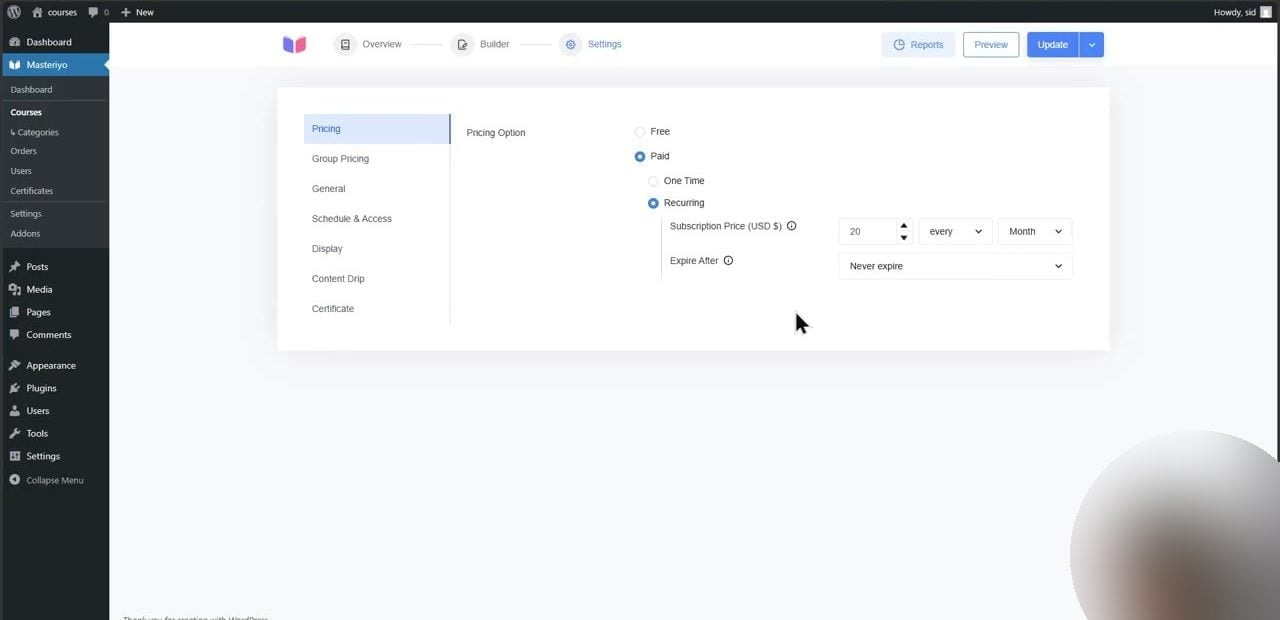
Three Masteriyo features do the heavy lifting in a membership-style setup, and all three live in the Pro plan ($149/yr intro, renews at $299/yr):
- Subscriptions / recurring pricing. What you see above: monthly or yearly billing per course, handled by the built-in checkout, with no WooCommerce required. 💳
- Course bundles. A bundle groups several courses under one price, which is exactly how you fake “membership tiers.” Starter bundle with three beginner courses, all-access bundle with everything. Each bundle is effectively one membership level.
- Content drip. Release lessons X days after enrollment or on specific calendar dates; more on why this matters for retention in a minute.
The checkout itself is built in: offline payment and PayPal work out of the box, and there’s a free Stripe addon. Masteriyo charges 0% transaction fees on every plan, so you only pay your gateway’s own cut. Here’s what your members see when they check out:
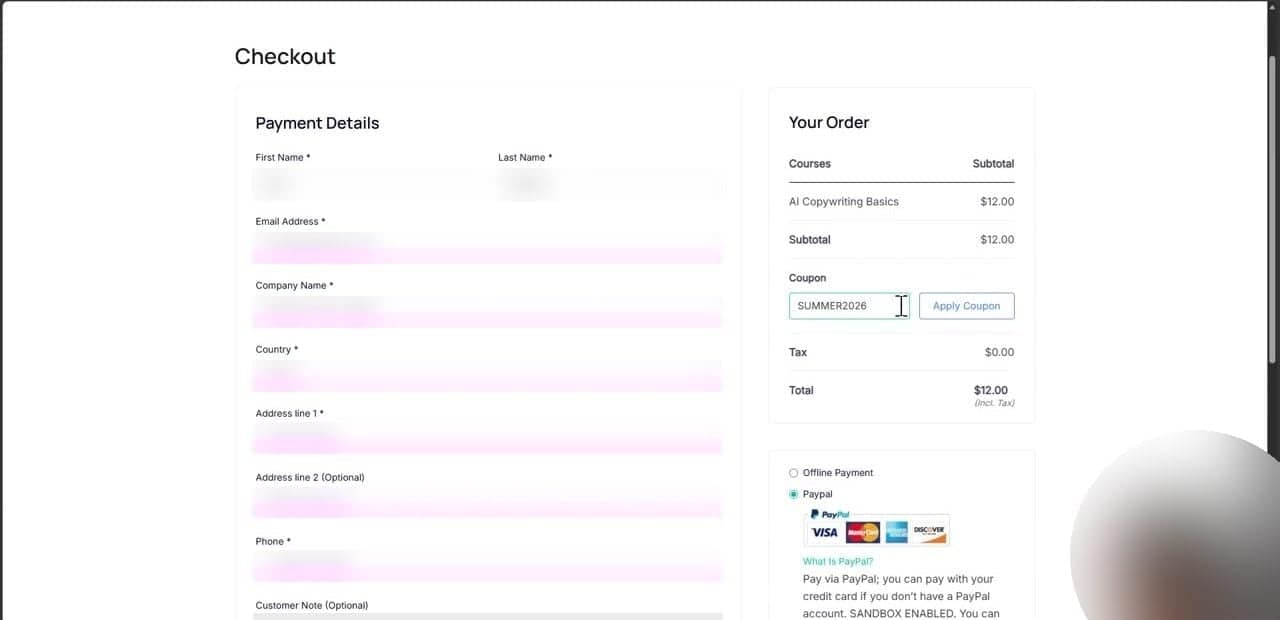
Now the part the feature list won’t tell you:
- There’s no native membership system. Subscriptions are per course or per bundle, not site-wide member levels with directories, member profiles, or forums. If you want that, keep reading.
- The renewal price doubles. $149/yr is the intro rate and year two costs $299, so budget for the real number.
- If you let the license lapse, your courses keep working; you just lose updates and support. Fair enough, but don’t let updates slide on something that processes payments.
Path 2: Masteriyo Pro + a dedicated membership plugin
Path 1 gets awkward when your membership is bigger than courses. Maybe you want a members-only blog, downloads, or a private community, with courses as one perk among several. That’s a job for a real membership plugin, with the LMS handling course delivery.
Masteriyo Pro ships integration addons for the two big names here: Paid Memberships Pro and Restrict Content Pro. Both integrations are Pro-gated, on the same $149/yr intro plan as above, renewing at $299.
The concept:
- The membership plugin owns the paywall. It handles member levels, registration, recurring billing, and restricting anything on the site: pages, posts, files.
- Masteriyo owns the learning. Courses, lessons, quizzes, certificates, and progress tracking.
- The integration connects them. A member joins a level in the membership plugin, and that level unlocks the courses you’ve mapped to it.
On the Paid Memberships Pro side, the core plugin is free and open source, and these days you download it directly from their site, since it’s no longer listed in the WordPress.org directory. The paid Standard plan ($499/yr) adds the premium add-ons and support. Restrict Content Pro is the other option; its packaging has been in flux lately, so verify current pricing before you commit.
This guide won’t walk through the setup screens click-by-click, for an honest reason: most of those screens belong to the membership plugin, not Masteriyo, and they change with every major release. The sequence stays the same, though: enable the integration in Masteriyo → Addons, create your membership levels, then map each level to the courses it should unlock. Both plugins’ own docs cover the current UI well.
Honest downsides: you’re now maintaining two commercial plugins (and possibly two renewals), settings live in two different places, and when something breaks you get to guess which plugin broke it. The upside is real membership infrastructure (levels, upgrades and downgrades, proration, member emails) that a course plugin was never going to give you.
Path 3: A membership-first tool like MemberPress
The third path flips the stack: start with a membership plugin that also does courses. MemberPress is the best-known option: membership levels and access rules first, with LMS features (course builder, quizzes, certificates, content dripping) built in.
What’s the course builder actually like? The built-in Courses addon handles it: a visual, drag-and-drop curriculum builder for structuring lessons, with student progress tracked automatically as members work through the material. The fine print is in the plan ladder: quizzes and completion certificates only unlock from Growth upward, and the gradebook sits at Scale. On Launch you’re building courses with no way to quiz anyone: fine for a straight content library, thin if how you teach relies on testing along the way.
The pricing ladder:
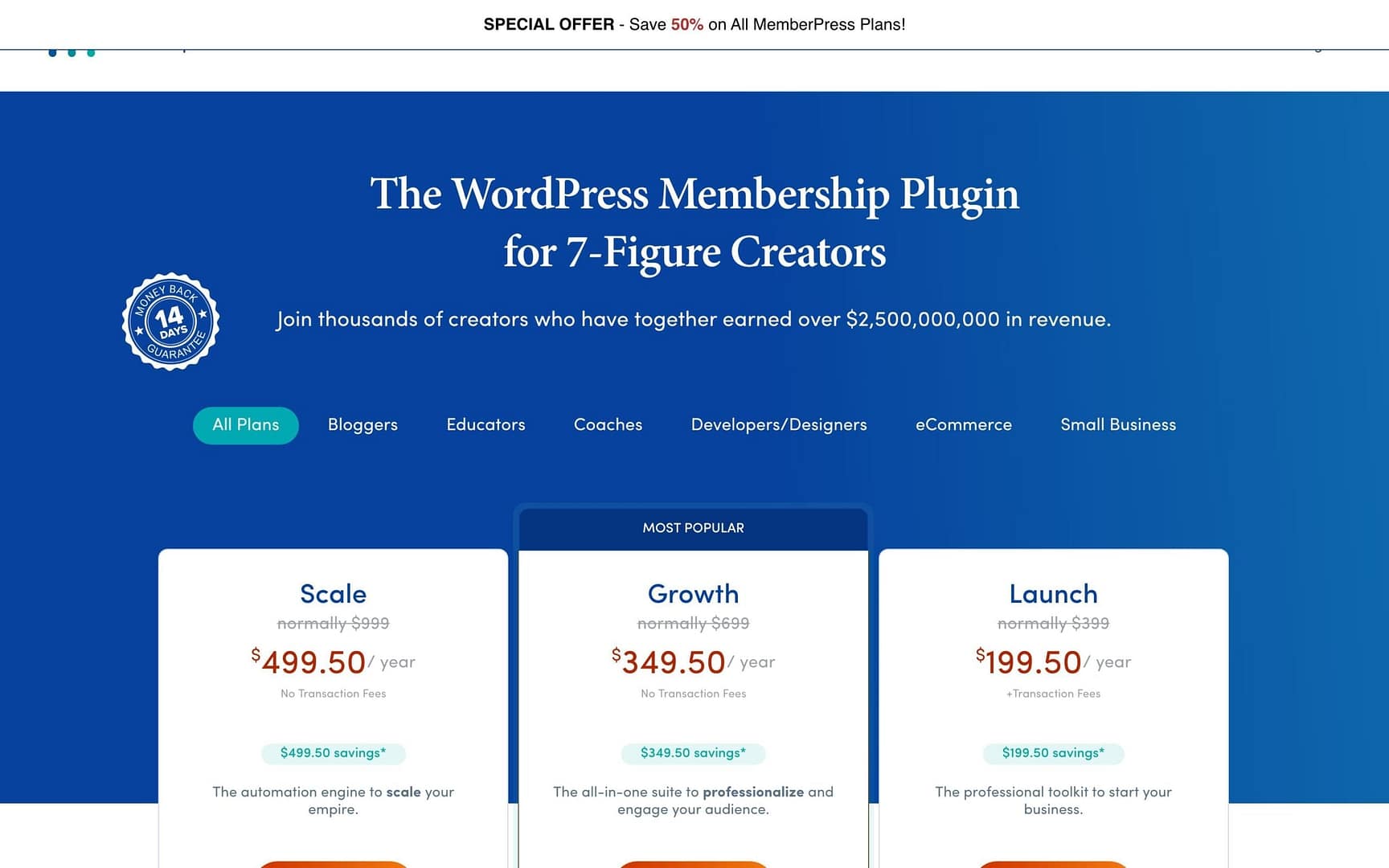
- Launch: $199.50/yr on a 50% promo (normally $399), and this tier adds a transaction fee on top of your gateway’s fees (4.9%, so check their current terms).
- Growth: $349.50/yr (normally $699), no transaction fee.
- Scale: $499.50/yr (normally $999), no transaction fee.
- No free tier. And, stop me if you’ve heard this one, the promo price renews at the full “normally” rate.
Choose this path if the membership is the product and courses are one part of it: gated posts, downloads, community perks, fine-grained access rules (“members at level B can read posts in category X”). MemberPress is genuinely good at that stuff. The trade-offs: the course features are competent rather than deep, the cheapest plan adds a transaction fee on top of your gateway’s fees (4.9%, check their current terms), and there’s no free version to test with. If MemberPress isn’t your speed, the alternatives in our membership plugins roundup are worth a look.
How to structure tiers, bundles, and drip
Whichever path you pick, the structure matters more than the tool. Here’s what works for course memberships:
- Two or three tiers, max. Every extra tier is a decision your visitor has to make, and confused visitors leave. A pattern that works: Tier 1 = the core library, Tier 2 = everything plus new monthly content, Tier 3 = everything plus coaching or live calls.
- Use bundles as your tiers. In Masteriyo, a course bundle with its own recurring price is a membership level; you just don’t have to call it one.
- Drip for retention, not just pacing. Drip content means releasing lessons over time instead of all at once. In a one-off course, drip stops students from bingeing. In a membership, drip gives people a concrete reason to still be subscribed in month three. Masteriyo Pro’s content drip offers both “X days after enrollment” and fixed calendar dates; MemberPress has its own dripping built in.
- Give month one a quick win. A short, finishable course early in the library gives members who complete something in week one a reason to log back in.
PRO TIP Offer monthly and annual billing on every tier. Annual members don’t churn monthly, and you get the cash up front. The classic pitch is two months free: pay for ten, get twelve.
And this is what your members’ library actually looks like on the front end: course cards with pricing and enrollment buttons.
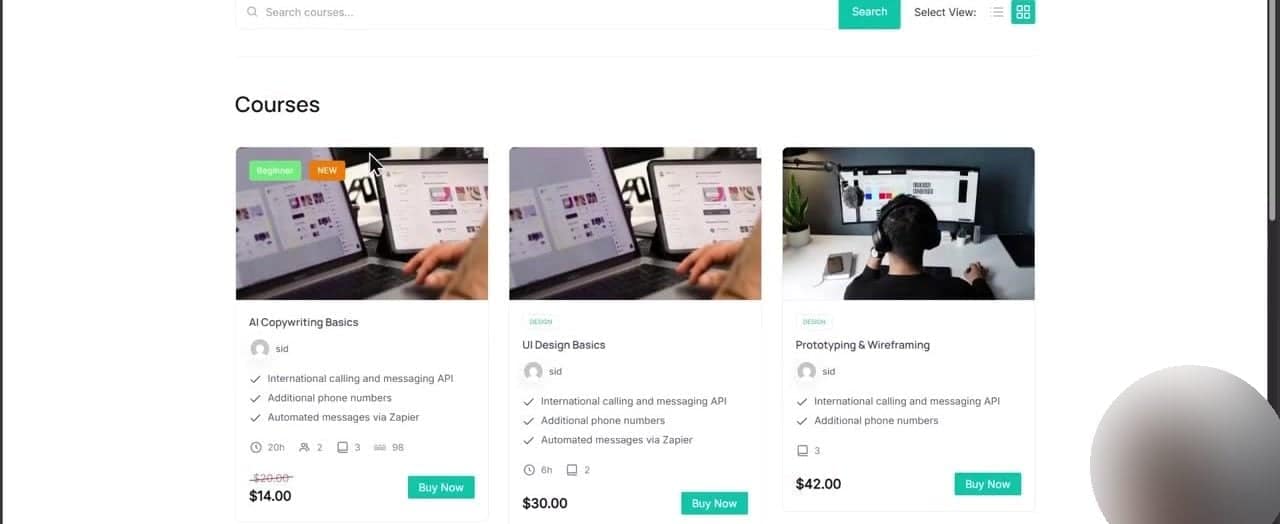
The churn reality nobody puts on the sales page
Churn is the share of members who cancel, and membership marketing never talks about it. This section will, qualitatively, because anyone quoting you a universal churn number is making it up.
What every membership owner will tell you:
- Members join for a course and leave when they finish it. That’s the big one: your library has to answer “what’s next?” before they ask it.
- Silence kills. If nothing new appears for two months, the membership starts looking like a bill instead of a benefit.
- People pause for life reasons. Busy season, budget, lost interest in the topic: not every cancellation is a failure.
- The fixes are boring but real: a visible content roadmap, drip schedules that always have something landing soon, regular member emails, and annual plans that smooth everything out.
The cheapest retention tool is a public “coming soon” page. Members who can see what lands next month have a reason to wait for it.
One more thing: a membership is a publishing commitment, not a product launch. If that sentence made you tired, the next section is for you.
When one-off sales beat memberships
Time for the honesty section. Skip the membership model when:
- You have one flagship course. One course is a product, not a library, so charge a fair one-off price for it.
- The transformation has an endpoint. “Pass the certification exam.” “Plan your wedding.” People want to finish and leave, and that’s fine.
- Your audience prefers ownership. Plenty of learners actively dislike subscriptions, and a “buy it, keep it forever” option respects that.
- You can’t commit to a content schedule. A stale membership is worse than no membership; it trains people to cancel.
The good news: it’s not either/or. A hybrid (flagship courses sold once, plus a membership for the growing library) is where a lot of course businesses end up. Masteriyo handles both on one site, since pricing is set per course: one-time here, recurring there. Start with one-off sales, then add the recurring layer once your library justifies it.
Final thoughts
Let’s recap the three paths:
- Path 1: Masteriyo Pro subscriptions. The simplest course-native route. $149/yr intro (renews $299), 0% transaction fees, bundles act as tiers, drip keeps members around.
- Path 2: Masteriyo Pro + Paid Memberships Pro. Real member levels and site-wide restriction, at the cost of running two plugins.
- Path 3: MemberPress. Membership-first with courses built in. Watch the Launch plan’s transaction fee on top of your gateway’s fees (4.9%, check their current terms), and the renewal doubling.
The bottom line: if you’re a course creator going recurring for the first time, start with Path 1. It has the fewest moving parts, and you can bolt a full membership plugin on later if you outgrow it. If courses are one slice of a bigger membership pie, Path 2 or 3 will fit better from day one.
And if you’re still building that first course, our guide on how to create an online course with WordPress walks through the whole process for free.
Are you running a course membership, or still on the fence? What’s holding you back? Let us know in the comments section below! 💬

FREE GUIDE
4 Essential Steps to Speed Up Your WordPress Website
Follow the simple steps in our 4-part mini series and reduce your loading times by 50-80%. 🚀
Yay! 🎉 You made it to the end of the article!