

Your site feels fast when you load it from your office, because you’re probably close to the server. Your visitors in another country or on the other side of a continent might be waiting several extra seconds, and you’d never know it from your own browser. Here’s how to actually see what they see.
Your own speed test is lying to you by omission
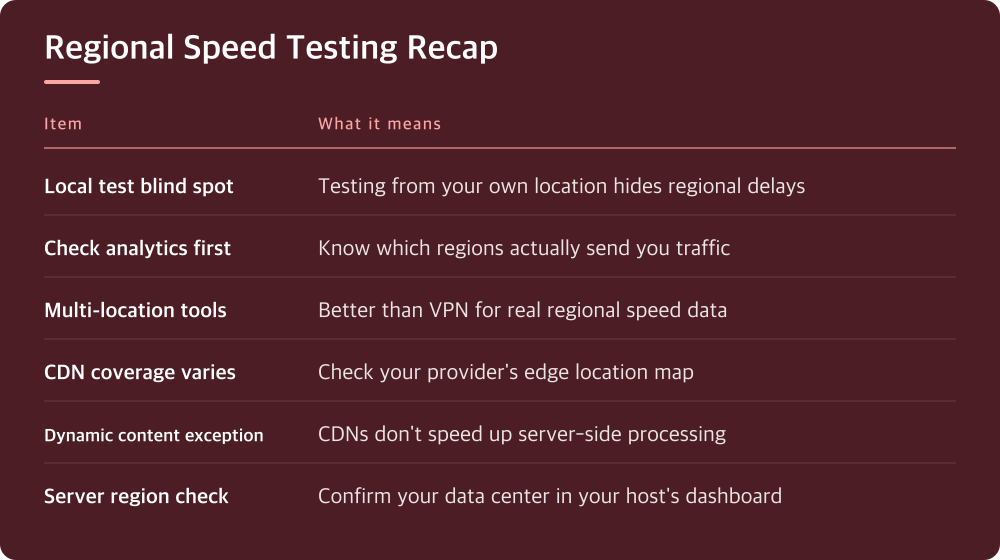
If you run a speed test from your laptop, you’re testing one path: from your location to your server. That path might be short and fast, or it might be the shortest one you’ll ever measure. Visitors in other regions take a completely different route through completely different infrastructure, and nothing about your local test tells you what that route looks like.
This matters more than people assume. A site hosted in one region can feel instant locally and noticeably sluggish for someone several thousand miles away, purely because of the physical distance data has to travel plus whatever network congestion sits along the way. No amount of local optimization fixes a problem that’s rooted in geography.
Find out where your visitors actually are before you test anything
Before picking test locations, look at your analytics. Whatever tool you use for traffic should have a geography or location report. Check it for the last few months, not just today, since traffic sources shift with campaigns, seasons, or growth in new markets.
If you have no analytics installed yet, that’s step one. You can’t test for a region if you don’t know you have visitors there. Even a rough breakdown by country is enough to start; you don’t need city-level precision for this exercise.
Pay attention to the regions with real traffic, not the ones with a handful of stray visits. Testing from every country on earth wastes time. Testing from your top three or four regions tells you almost everything you need to know.
Use multi-location testing tools instead of guessing from a VPN
Several free and paid tools let you run a speed test from multiple global locations at once, showing load time, time to first byte, and sometimes a waterfall of every resource loaded, all broken out by test location. Search for ‘website speed test multiple locations’ and you’ll find several reputable options; compare a few before settling on one.
Some people try to fake this with a VPN, connecting through a server in another country and then running a normal speed test. It’s better than nothing, but it’s not the same thing. A VPN adds its own latency and routing quirks on top of whatever your site already has, muddying the result. Dedicated multi-location testing tools ping from real infrastructure in that region without that extra layer of noise.
Whichever tool you use, run the test more than once per location. A single result can catch a network blip or a temporary CDN cache miss and give you a false impression either way.
A CDN changes the shape of the problem, not whether you should test
If you’re using a content delivery network, static assets like images, CSS, and JavaScript get served from a location near the visitor, which should narrow the regional gap. But your CDN’s coverage is not uniform everywhere, and some regions have fewer edge locations than others. Check your CDN provider’s network map, which they usually publish, to see how close their nearest edge is to your actual traffic.
Dynamic content is a different story. Anything generated on the fly, database queries, personalized content, server-side rendering, still has to make a round trip to your origin server regardless of what your CDN handles. If your audience is global but your origin server isn’t, that round trip is where the delay hides even with a CDN in place.
This is exactly why testing from multiple regions matters even after you’ve added a CDN. It’s easy to assume the CDN solved the problem and stop checking. Testing shows you whether it actually closed the gap for the regions that matter to you.
Server location and routing matter more than most people realize
Your hosting provider’s control panel or account dashboard will usually show you which data center your site runs in, or let you choose one when you sign up. If your actual visitor base is concentrated in a region far from that data center, that’s a structural issue no amount of caching plugins will fully fix.
Some hosts offer multiple data center regions or let you migrate between them. Check your provider’s documentation or support resources for how this works in their system, since the process varies a lot between providers and isn’t something to guess at.
Routing is the other half of this. Even with a well-placed server, the network path your data takes can be inefficient. This is harder to diagnose precisely, but consistently slow results from one region on a multi-location test, even when the raw distance isn’t extreme, is a sign something along the route is worth investigating with your host’s support team.

What to actually do with this today
Start by pulling up your analytics and identifying your top three or four visitor regions by traffic volume. Then run a multi-location speed test against your homepage and one or two other important pages, recording the results for each region separately so you have something to compare against later.
Look specifically at time to first byte for each location, since that number reflects server and routing delay before a CDN’s asset caching even comes into play. If one region is dramatically worse than the others, that’s your priority, not a vague sense that ‘the site should be faster everywhere.’
Set a reminder to repeat this test every few months, or whenever your traffic geography shifts. Site performance isn’t a one-time fix; it’s a thing that drifts as your audience changes and as providers update their infrastructure. Treat today’s test as a baseline, not a final verdict.
Do this today
- Check your analytics for top visitor regions
- Run a multi-location speed test on key pages
- Compare time to first byte across regions
- Check your CDN provider’s edge location map
- Confirm your hosting data center location
※ This is informational and not a recommendation of any specific product or company.