
You see the padlock icon and assume the site is safe. It isn’t that simple. SSL/TLS does one job well — encrypting the connection between a browser and a server — and a lot of people assume it does several jobs it was never built for.
The padlock only means the connection is encrypted, not that the site is trustworthy
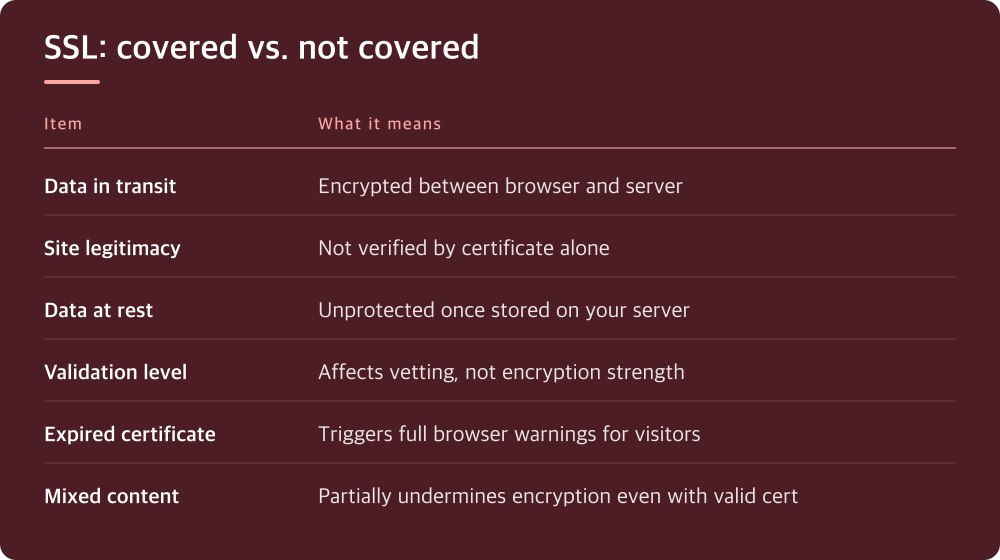
An SSL certificate’s actual job is narrow: it encrypts data moving between the visitor’s browser and your server, and it confirms the browser is talking to the domain it thinks it’s talking to. That’s it. It says nothing about whether the content on the page is accurate, whether the business behind it is legitimate, or whether the server itself is configured securely.
This matters because phishing sites have had valid certificates for years. Getting a certificate issued requires proving control of a domain, not proving you’re a trustworthy operator. A scam site on ‘yourbankk-support.com’ can have a perfectly valid padlock. The padlock confirms encryption, not honesty.
If you’re evaluating a site’s legitimacy, the certificate is one weak signal among many, not a verdict.
It stops eavesdropping on data in transit, nothing more
Where SSL genuinely earns its keep is stopping someone on the same network — public WiFi, a compromised router, an ISP — from reading or tampering with data as it travels. Login credentials, form submissions, session cookies: all of that is scrambled in transit so a middleman can’t casually read it.
This is real protection and worth having for that reason alone. Before HTTPS was standard, anyone on a shared network could potentially capture passwords typed into a plain HTTP login form. That attack is largely closed off now.
But ‘in transit’ is the key phrase. Once the data arrives at your server and gets written to a database, SSL’s job is done. What happens to it after that is a completely separate problem.
A certificate does nothing for data once it’s sitting on your server
If your database gets breached, outdated plugins get exploited, or a developer leaves debug credentials in a public repo, SSL offers zero protection. It never touched that layer. Server hardening, access controls, patching, and secure coding practices are a different job with different tools.
This is the gap that trips people up most often. A site owner installs a certificate, sees the padlock, and treats security as handled. Meanwhile the admin panel still uses a weak password, the CMS hasn’t been updated in a year, and file permissions are wide open.
Encryption in transit and security at rest are not the same category of problem, and fixing one doesn’t touch the other. Treat them as separate line items on your to-do list, because they are.
Certificate type changes what’s displayed, not how strong the encryption is
Certificates generally come in a few validation levels — domain validation, organization validation, and extended validation — and the difference is in how much vetting the issuer does of who’s requesting the certificate, not in the strength of the encryption itself. A domain-validated certificate on a small blog encrypts traffic just as effectively as a more thoroughly vetted one on a bank’s site.
Higher validation levels used to come with more visible trust indicators in the browser, but browser UI has changed over time, so don’t assume a particular visual badge still appears. Check your browser’s current behavior rather than assuming something you remember from years ago still holds.
If you’re choosing a certificate type, base it on what your audience or compliance requirements expect, not on a belief that it makes the connection more secure. It doesn’t.
An expired or misconfigured certificate breaks trust fast, so renewal and setup both need attention
Certificates expire, and letting one lapse throws a full-page browser warning at every visitor, which tanks trust and traffic in a hurry. Most hosts and certificate providers now offer automatic renewal, but ‘offer’ isn’t the same as ‘guaranteed to work silently forever’ — mixed content errors, misconfigured renewal hooks, and DNS issues can all cause a renewal to fail quietly.
Equally common: a certificate that’s valid but the site still throws ‘mixed content’ warnings because some images, scripts, or stylesheets load over plain HTTP. Browsers flag this because it partially undermines the encryption you just set up. Fixing it usually means updating hardcoded HTTP links in your theme, plugins, or database.
Check your certificate’s expiration date and renewal status directly in your hosting panel or certificate provider’s dashboard — the exact location varies by provider, so look under SSL/TLS settings or domain management.
What to actually do today
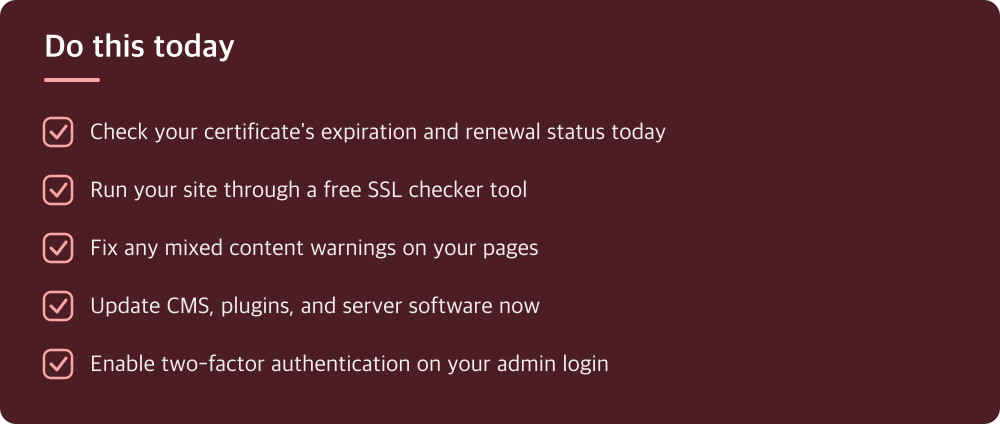
Start by confirming your certificate is active and set to auto-renew; find this in your host’s control panel or your certificate provider’s dashboard, under sections usually labeled SSL, TLS, or Security. Don’t assume auto-renewal is working just because you set it up once — check the actual expiration date.
Run your site through a free SSL checker tool to catch mixed content warnings, weak configurations, or chain issues that a quick glance at the padlock won’t reveal. These tools are widely available and don’t require signing up for anything.
Then shift your attention to the things SSL doesn’t cover: when did you last update your CMS, plugins, and server software? Is your admin login protected with a strong password and two-factor authentication? Is your database backed up somewhere you’ve actually tested restoring from? SSL was never going to answer these questions, and no amount of encryption fixes a weak password or an outdated plugin.
Do this today
- Check your certificate’s expiration and renewal status today
- Run your site through a free SSL checker tool
- Fix any mixed content warnings on your pages
- Update CMS, plugins, and server software now
- Enable two-factor authentication on your admin login
※ This is informational and not a recommendation of any specific product or company.