
Running a site with multiple writers means you’re not the only one making decisions about what gets published. Without some structure, you’ll end up with inconsistent quality, missed deadlines, and arguments about who broke what. The good news: this doesn’t require complicated tools or micromanaging.
Set a single source of truth for editorial standards
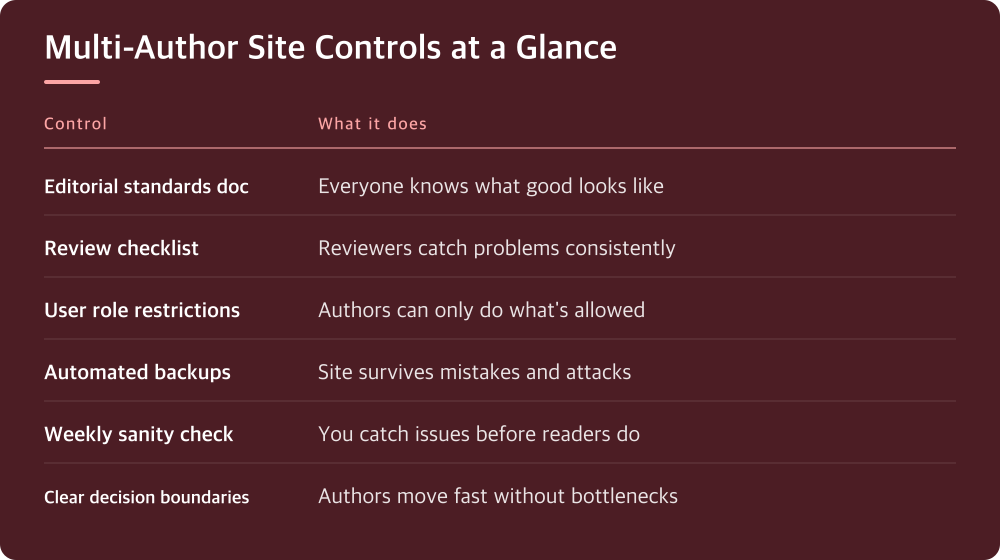
Every author needs to know what they’re aiming for. That means one document—not scattered Slack messages or emails—that covers voice, formatting, images, and publishing rules. Write it like you’re explaining to someone who wasn’t in the room when you decided things. Include examples of what good looks like and what doesn’t.
Your standards document should live somewhere all authors can find it. A shared Google Doc works fine. Update it when things change and tell everyone you did. When someone publishes something that doesn’t fit, you point to the document, not to your personal preference. This removes feelings from the equation.
Be specific about things that matter to your site’s performance or security. If you run WordPress, specify which plugins are allowed, how image files should be named, what the maximum file size is. If you care about SEO, include your rules for meta descriptions and heading structure. Skip the stuff that doesn’t actually affect the outcome.
Use a review process that doesn’t require you to rewrite everything
You can’t review every post word-for-word without burning out. Instead, decide what actually needs your eyes before it goes live. For some sites, that’s everything. For others, it’s just posts on sensitive topics or ones that affect other sections of the site.
Create a template or checklist that reviewers use. Does the post follow the style guide? Are images compressed and in the right format? Does it link properly to existing content? Are there any security issues like hardcoded URLs? A quick checklist catches most problems without requiring someone to reread every sentence.
Give authors a deadline for submission that gives you real time to review—not two hours before publish. Make the review feedback specific: not ‘this needs work’ but ‘this intro is 200 words when our guide says 50-100; cut to the first two sentences.’ Authors learn faster when they know exactly what to fix.
Automate the technical parts so humans only handle judgment calls
A lot of multi-author problems aren’t actually about people—they’re about preventable mistakes. Your site’s backup runs on a schedule you set once, not on someone remembering to do it. Your DNS doesn’t change because someone guessed at a setting. Automation handles the technical baseline.
In WordPress, this means the right plugins for your workflow. Some teams use editorial calendar tools, others use user role restrictions. You decide what each author can do: who can publish immediately, who needs approval, who can only write drafts. This is enforced by your system, not by you asking people to behave.
Look at what tasks keep coming up in reviews. If you’re constantly reminding authors to add meta descriptions, write a plugin or use a tool that prompts for them. If image sizing is a problem, set up automatic resizing. The goal is to make it harder to do the wrong thing than the right thing.
Give authors permission to make decisions within their lane
Trying to control every choice kills efficiency and burns out your team. Instead, define what decisions belong to the author versus what needs approval. A food writer can pick their own recipes and photos. A financial post touching on tax law probably needs a second pair of eyes.
Document these boundaries so there’s no guessing. ‘You can publish anything under 2,000 words about your assigned topic without approval. Anything over 2,000 words or mentioning our competitors needs review.’ Clear rules mean authors move fast and you’re not interrupted with permission questions.
When an author makes a decision you would have made differently, let it go if it doesn’t break your standards or security. This is how they get better and how you avoid becoming the bottleneck. Save your corrections for things that actually matter.
Check your site weekly as though you’re a visitor, not the owner
You live inside your site and stop noticing things. Every Friday or Monday, spend twenty minutes looking at it like someone who just found it in a search. Does the newest post look polished? Are the navigation links working? Has something weird published that shouldn’t have?
This isn’t a deep audit—it’s a sanity check. Is there anything obviously broken? Anything that would embarrass the site in front of your audience? A glitch you didn’t know about? A post that published incomplete? These things happen and your eyes catch them before readers do.
This habit also lets you spot patterns in what authors struggle with. If you keep finding formatting errors, that’s a sign your standards document needs clearer examples or a process change. If posts are late, you might need to adjust deadlines or check whether reviewers are the bottleneck.
Protect your site’s performance and security before it becomes a multi-author problem
The moment you give people access to your site, you’ve multiplied the number of ways it can break. Your backups need to work without anyone thinking about them. Your hosting needs to handle traffic spikes. Your updates need to stay current. These aren’t author problems—they’re foundation problems.
Set up automated backups through your hosting provider or a dedicated plugin. Test a restore every quarter to make sure they actually work. Enable two-factor authentication for all author accounts. Use a content delivery network if you’re serving images to audiences in multiple regions. These are one-time decisions that pay dividends.
Document your site’s technical requirements somewhere so new authors know what they can and cannot do. Can they install plugins? Upload custom code? Add their own tracking pixels? If the answer is no, make sure your hosting or WordPress setup prevents them from trying. Prevention beats cleanup every time.
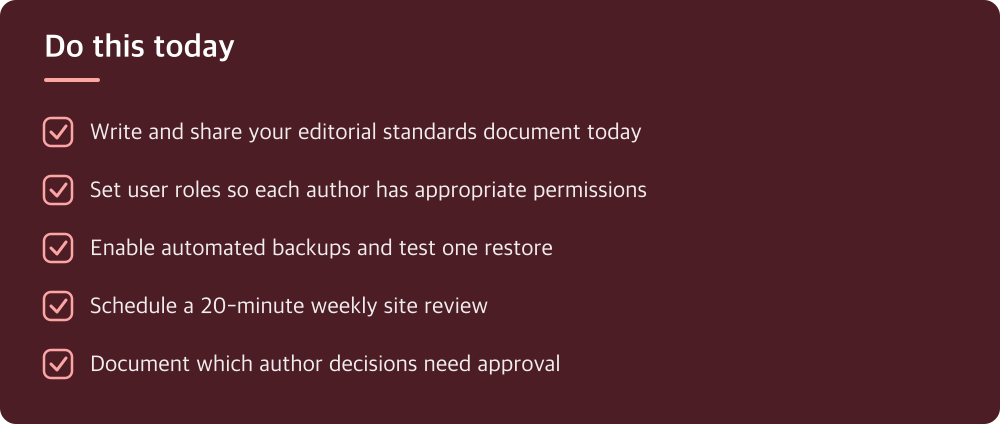
Do this today
- Write and share your editorial standards document today
- Set user roles so each author has appropriate permissions
- Enable automated backups and test one restore
- Schedule a 20-minute weekly site review
- Document which author decisions need approval
※ This is informational and not a recommendation of any specific product or company.