

You’re looking at hosting plans and the names mean nothing. Shared sounds cheap but scary. VPS sounds technical. Managed sounds expensive. The real question isn’t which type sounds best—it’s which one matches your actual situation right now.
Start with what you’re actually running, not what you might run someday
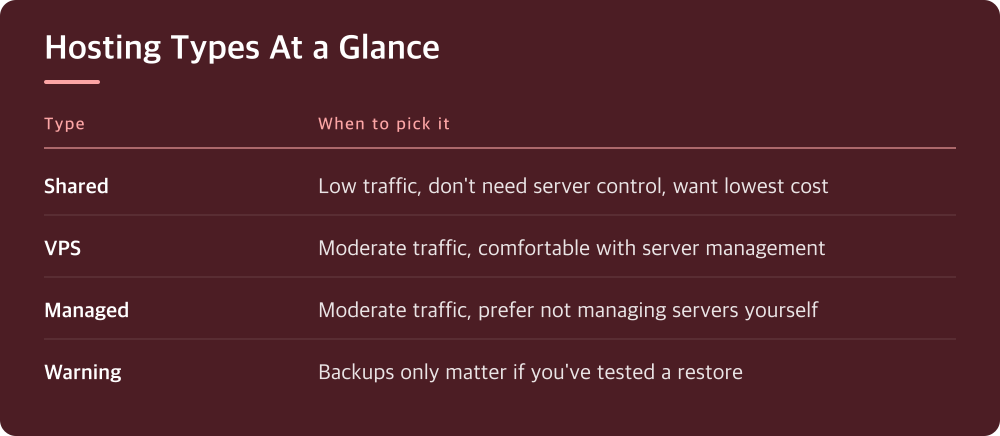
Most people pick the wrong hosting tier because they’re thinking about a future version of their site that may never exist. You don’t need VPS because you might go viral. You need VPS because you’re already getting real traffic and your current setup is struggling. The hierarchy is real but it’s also honest: shared hosting handles most small sites fine. A lot of them. If you’re getting a few hundred visitors a month and running WordPress with some plugins, shared hosting usually works. The constraint isn’t some theoretical limit—it’s actual performance you can measure right now.
Before you shop, spend a week checking your current numbers. Log into your hosting panel and look at actual traffic, actual CPU usage, actual memory usage if those metrics are available. Ask your host for a performance report if you can’t see them. If nothing is red-lined and your site loads in under 3 seconds most of the time, you probably don’t need to upgrade.
Shared hosting breaks when too many sites fight for the same resources
Here’s how shared hosting actually works: your site lives on a server with hundreds of other sites, and you all share the CPU, memory, and storage. When your neighbor’s site gets hammered with traffic, you feel it. This isn’t a failure—it’s just how the economics work. The hosting company keeps costs down by overloading servers, betting that not every site will spike at once.
This matters specifically when: you run database-heavy operations, you’re doing automated backups or bulk imports while people are visiting, you installed a plugin that does a lot of processing, or your site genuinely gets enough traffic that it’s noticeable. If any of those are true, shared hosting starts creating real problems. Your site gets slow. Pages timeout. Your host throttles you or your whole account stops responding. You’ll know this is happening because it won’t be random—it’ll be consistent, usually during the same hours.
VPS gives you your own slice of the server, but you run it yourself
A VPS (Virtual Private Server) is what you get when you move from sharing a house to renting an apartment. You have guaranteed resources: a certain amount of CPU, memory, and storage that are yours alone. No neighbor can slow you down. But here’s the part hosting companies don’t emphasize enough: you’re now responsible for the whole apartment.
That means you manage your own server software, apply your own security patches, restart services when they crash, and debug problems yourself or pay someone to do it. Most VPS providers give you an admin panel with some basic utilities, but if something goes wrong at the operating system level, you’re dealing with it. This is fine if you know Linux basics or if you’re paying a contractor who does. It’s a real problem if you’re hoping to never think about servers. The cost difference between shared and VPS is usually modest (check what your target providers charge), but the effort difference is enormous.
Managed hosting removes the server management but costs more for a reason
Managed hosting means you rent a VPS-equivalent setup but the hosting company handles all the server-level stuff. They apply patches, they monitor uptime, they restart services automatically, they handle some security hardening. You just manage your website the same way you did on shared hosting. No server knowledge required.
The obvious tradeoff is price—managed hosting typically costs more than VPS because the company is doing actual work for you. What’s less obvious is that managed hosting is often limited in what you can install or customize. Some providers lock down the server environment so much that you can’t install a particular package you need or run a specific process. Check what the provider actually allows before you sign up. And if you don’t actually need those freedoms, managed hosting is often the right call: you get better performance than shared, better peace of mind than VPS, and you’re paying for time you don’t have to spend on maintenance.
Your backups are only real if you can actually restore them
Every hosting tier advertises backups. Most of them are useless because you’ve never actually tested one. A backup you can’t restore is just data that sits on a server. This matters more when you’re using VPS, because if something fails, you’re the one restoring it. If you don’t have a tested process, you’ll be panicking.
Before you upgrade to anything, confirm three things with your current host: where your backups are stored, how you’d download them if the whole account failed, and whether they keep them long enough to matter (usually you want at least 30 days of daily backups). Then actually download one and confirm you can open it. Do this on shared hosting, on VPS, everywhere. It takes an hour and it’s the difference between having a real backup plan and having a disaster waiting to happen.
Audit your actual needs, then pick the tier, then evaluate specific hosts
Here’s the decision sequence that actually works: First, what’s your real traffic and what’s the real load you’re putting on the server? If it’s low and stable, shared hosting works. If it’s moderate or growing, you need VPS or managed. If you want someone else handling server stuff, managed. If you don’t mind managing it yourself or are paying someone to do it, VPS is cheaper.
Second, make a list of what you actually need to run. If it’s WordPress plus some standard plugins, everything works. If you need specific software, specific databases, or custom code, check the managed plans to confirm they support it. Some don’t. Third, compare actual prices between options from different providers—not the advertised price (it changes constantly), but what the actual tiers cost today. Check what storage you actually get, what bandwidth limits exist if any, and what the support terms are. Then pick. Spending time on this now means you won’t have to migrate in six months because you picked wrong.
Do this today
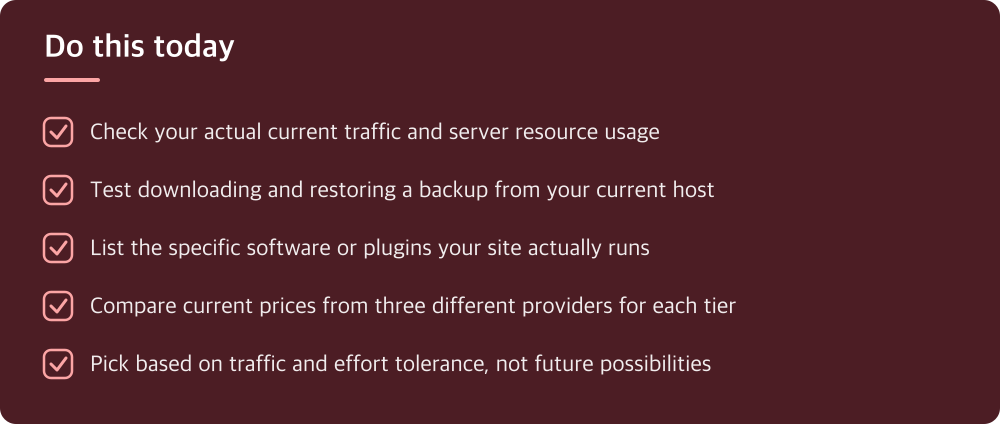
- Check your actual current traffic and server resource usage
- Test downloading and restoring a backup from your current host
- List the specific software or plugins your site actually runs
- Compare current prices from three different providers for each tier
- Pick based on traffic and effort tolerance, not future possibilities
※ This is informational and not a recommendation of any specific product or company.